
How to crawl a website the right way
.jpg)
Web Crawling vs Web Scraping in 2026: What’s the Difference?
The word “crawling” has become shorthand for almost any automated way of getting data from the web.
But in reality, crawling and scraping are not the same thing, and confusing them can lead to slower, more complicated data workflows.
If your goal is to extract usable data from websites (not build your own search engine), understanding the difference matters.
Let’s break it down clearly for 2026.
Crawling vs Scraping: What’s the Real Difference?
To collect web data programmatically, you need software that can:
- Access a webpage
- Interpret the underlying code (HTML, APIs, JavaScript-rendered content)
- Extract specific data fields
- Deliver that data in a structured format (CSV, JSON, database, API feed)
That process is commonly called web scraping or more accurately today, web data extraction.
A crawler, on the other hand, does something different.
A crawler’s job is to discover URLs.
It doesn’t focus on extracting specific data fields. Instead, it follows links from page to page, building a list of URLs it finds along the way.
In short:
- Crawler = finds pages
- Extractor (Scraper) = pulls data from pages
They work together, but they serve different purposes.
How Crawlers Work?
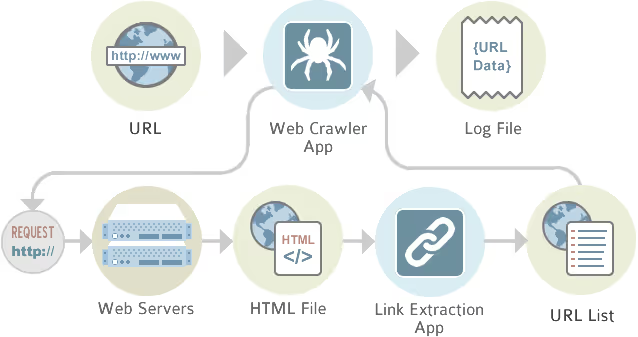
A crawler starts from a given URL.
From there, it:
- Finds links on that page
- Follows those links
- Finds links on those new pages
- Repeats the process
This loop continues until it reaches a defined limit (depth, domain restriction, or rules you set).
This is how search engines discover the web.
The upside? Crawlers aim to be comprehensive.
The downside?
- They’re slow
- They create heavy load on websites
- They generate large numbers of irrelevant URLs
- They often need to be rerun entirely for updates
And in 2026, that approach isn’t always efficient, especially when modern websites are dynamic, API-driven, or personalized.
Why Crawling Isn’t Always the Best Starting Point?
Crawling assumes that:
- All relevant content is linked
- Pages are static HTML
- Every page is worth visiting
But modern websites frequently use:
- Infinite scroll
- Client-side rendering (SPAs)
- JavaScript frameworks
- Hidden API endpoints
- Dynamic filtering
A crawler may miss data entirely or waste time indexing pages you don’t need.
If you already understand the structure of a website, crawling the entire domain is often unnecessary.
There are faster, more targeted methods.
Extractors: A More Targeted Approach
An extractor (or scraper) is trained to recognize specific data patterns on a page.
Instead of visiting everything, it focuses only on:
- Product listings
- Profile pages
- Search result pages
- Review sections
- Pricing fields
Once built, an extractor can be rerun at any time, no need to rediscover URLs from scratch.
This makes it:
- Faster
- Refreshable
- More precise
- Less disruptive to the target website
Modern platforms like Import.io combine smart extraction logic with controlled crawling only when necessary, reducing unnecessary load while improving accuracy.
%20(1).avif)
When You Don’t Need a Crawler
In many cases, crawling is overkill.
Here are common scenarios where you can skip it.
1. Data on a Single Page
If all the data you need exists on one page:
Don’t crawl.
Just build an extractor for that page.
Simple, fast, efficient.
2. Pagination (Multi-Page Lists)
If data is split across multiple pages (e.g., page=1, page=2, page=3), look for a URL pattern.
For example:
- site.com/products?page=1
- site.com/products?page=2
If the pattern is predictable, you can:
- Build an extractor for page 1
- Generate the list of URLs using the pattern
- Run them through the extractor
No crawler required.
3. Profile Pages Linked from a Directory
A very common structure:
- One directory page listing profiles
- Each profile contains structured data
The efficient approach:
- Extract links from the directory
- Build a second extractor for the profile page
- Feed the URLs from the first extractor into the second
This chaining method handles most real-world use cases quickly and cleanly.
In practice, this covers 80–90% of extraction needs.
When Crawling Makes Sense?
Crawling is useful when:
- You don’t know the site structure
- The URL pattern isn’t predictable
- You need full domain discovery
- You’re conducting broad content audits
But in 2026, crawling should be:
- Targeted
- Controlled
- Respectful of website infrastructure
Building an Efficient Crawler
If you must crawl, optimize it carefully.
Key controls include:
Crawl Depth
Limit how many clicks from the start page the crawler travels.
Exclusions
Define which sections to avoid.
URL Templates
Specify which URLs contain the data you actually want.
Concurrency Limits
Restrict how many pages are visited simultaneously.
Rate Limiting
Add delays between requests to reduce server strain.
Logging
Save visited URLs to avoid reprocessing and to troubleshoot errors.
Modern extraction platforms handle these controls automatically, reducing risk and improving reliability.
Legal and Ethical Considerations in 2026
Web data collection is legal in many contexts, but responsible practices matter.
Best practices include:
- Respecting robots.txt when appropriate
- Reviewing Terms of Service
- Avoiding excessive server load
- Ensuring compliance with data privacy laws (GDPR, CCPA, etc.)
- Not extracting protected personal data
The conversation has evolved: today, responsible data collection is not just technical, it’s operational and reputational.
Managed web data services reduce legal exposure and compliance risk by handling infrastructure and monitoring at scale.
Crawling vs Extraction: Choosing the Right Tool
Here’s the modern way to think about it:
Use CaseBest ToolKnown page structureExtractorPredictable paginationExtractor + URL patternDirectory → profilesChained extractorsUnknown site mapTargeted crawlerLarge-scale recurring updatesManaged extraction platform
Crawling is about discovery.
Extraction is about precision.
In 2026, precision usually wins.
The Smarter Approach to Web Data
Building scrapers from scratch used to require heavy engineering investment.
Today, no-code and managed platforms make web data integration significantly easier.
With modern tools, you can:
- Extract data without writing custom scripts
- Refresh datasets automatically
- Deliver structured outputs directly into BI systems
- Scale across thousands of pages
- Maintain higher data quality
Platforms like Import.io combine targeted extraction, intelligent crawling when needed, scheduling, and managed delivery, making web data usable without requiring in-house scraper maintenance.
Final Perspective
The word “crawling” may be used loosely, but in practice it’s just one part of the web data ecosystem.
If your goal is insight, not indexing the entire internet, then targeted extraction is usually the smarter path.
In 2026, efficient web data strategies prioritize:
- Precision over brute force
- Refreshable datasets over static lists
- Structured outputs over raw HTML
- Compliance and sustainability
Crawling has its place.
But extraction is where the real value lies.
