
5 Yahoo! Pipes alternatives that are actually better than Pipes (2026 update)

The original article was published on 09.06.2015, updated 21.01.2026
It’s the end of an era. A recent TechCrunch article announced that sadly we’ll have to say goodbye to Yahoo! Pipes. Pipes, a visual interface that lets you aggregate and filter web data without requiring programming skills, is being sunset by Yahoo! next month. Which of course means all of you who relied on Pipes for your data mashing needs, will have to find a Yahoo! Pipes alternative.
Pipes captured a concept and desire that people felt across the web, even back in 2007; the need to be able to use the information on the web to make new things, find patterns, and publish projects. With this consumer desire, Yahoo! pushed the web forward in a way no one had done before, making a task that was previously only accessible to a select few, widely available. This is a mission we still believe in today.
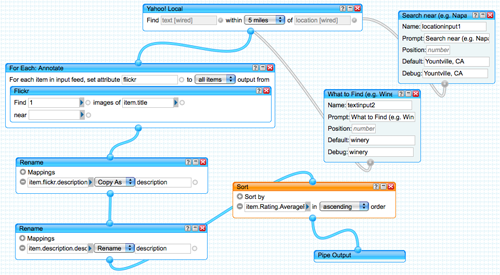
As sad as we are to see a revolutionary technology like Yahoo! Pipes bite the dust, we have to be honest… Pipes was becoming out of date. Today’s web data technologies allow you to do so much more than combine RSS feeds. Pipes inspired a whole industry of web data technologies that have taken what Yahoo! started and elevated it to the next level.
So, without further ado, here are 5 options for a Yahoo! Pipes alternative that is actually better than Pipes:
1. IFTTT
If This Then That (IFTTT) is often cited as a direct Pipes descendent. It is similar to Pipes in that you can mash together different structured data feeds from other applications using point and click. But where IFTTT excels is your ability to trigger these interactions by setting parameters that say, “If this happens on App A, then push this to App B” – pretty much operating how the name implies.
2. Zapier
Zaier is basically the enterprise version of IFTTT, with a few additional features. You can easily streamline data from different websites, filter them, and choose to either publish it to social networks or save them on your cloud storage. Like Pipes, Zapier has a searchable database of “zaps” that other users have created to popular apps. Actually creating an entirely new zap (to a new app) requires being able to access an app’s webhook. This can require some developer skills, but Zapier already has integrations with more than 400 apps so chances are you can probably find what you’re looking for.
3. Import.io
Yahoo! Pipes had a great feature which let you enter a URL and Pipes would extract all the structured data feeds it could find on that URL – meaning you didn’t have to. Import.io takes that concept a step further by letting you enter a URL and create a structured data feed (API), even if there wasn’t one there to begin with. If it can’t create an API automatically, you can always use the point and click app to create your own.
4. FeedsAPI
If combining RSS feeds is what got you excited about Pipes, then FeedsAPI is probably your next go to. The app lets you easily extract Full-text RSS feeds from different websites, customize those feeds, and easily syndicate or distribute them to your preferred channels. The tool is pretty impressive. It allows turning static single HTML pages into an RSS news feed which can also be received through timely emails, Evernote entry, blog post, PDF, or JSON file. The only downside is the lack of a free version.
5. Huginn
Huginn is an app you can grab from GitHub, which allows you to do everything Yahoo! Pipes could do, in addition to most of the capabilities of IFTTT. You can run it on your own server, or you deploy it on Heroku for free. Because it’s on Github, Huginn has gathered quite an active support community. So if the interface isn’t quite as easy to use as you may have hoped, there are plenty of people willing to help you out.
2026 update:
Yahoo! Pipes Is Gone - Here Are the Best Alternatives in 2026
Yahoo! Pipes shut down more than a decade ago, but the problem it solved never disappeared.
Back in 2007, Pipes gave non-developers a visual way to aggregate, filter, and republish web data, mostly through RSS feeds. At the time, that was revolutionary. But by the time Pipes was discontinued in 2015, the web had already changed. And by 2026, it’s changed completely.
Today’s web is dynamic, authenticated, API-driven, and increasingly used as live business data. RSS mashups alone aren’t enough anymore. Modern teams want to:
- Turn websites into structured datasets
- Automate workflows across tools
- Monitor changes on pages that don’t expose feeds
- Feed analytics, BI, and AI systems with reliable web data
So instead of revisiting only the tools people talked about in 2015, here’s an updated, realistic list of Yahoo! Pipes alternatives that teams actually use in 2026, starting with the most powerful evolution of the Pipes idea.
1. Import.io (Best overall Pipes replacement)
Yahoo! Pipes was great at remixing existing structured data. Import.io solves the much bigger 2026 problem: most of the web is not structured at all.
Import.io lets you turn real websites, product pages, listings, directories, dashboards, into clean, structured datasets and APIs using a point-and-click interface. Data can be scheduled, monitored, and delivered directly into analytics tools, databases, or automation platforms.
Why Import.io is the true successor to Pipes:
- Works on modern, JavaScript-heavy websites
- Creates tables and APIs, not just feeds
- Scales from one-off projects to enterprise pipelines
- No scraping scripts or maintenance required
Best for:
Competitive intelligence, price monitoring, market research, lead generation, and any use case where RSS doesn’t exist or isn’t reliable.
If Pipes democratized feed mashups, Import.io democratizes web data itself.
.png)
2. Zapier (Best for app-to-app workflows)
Zapier is one of the most widely used automation platforms in 2026. It connects thousands of SaaS tools and is often what people thought Pipes was doing, moving data between systems automatically.
Best for:
- RSS → Slack, email, Google Sheets
- CMS publishing workflows
- Notifications and lightweight data movement
Where it falls short:
Zapier assumes your data already exists in structured form. It doesn’t extract data from complex websites on its own.
3. Make (Best visual workflow builder)
Make (formerly Integromat) feels closest to Yahoo! Pipes’ visual DNA. It lets you design multi-step, branching workflows with filters and transformations visually.
Best for:
- Complex logic and multi-step automations
- Teams that want visibility into “how data flows”
- Transforming and routing structured data
Common pairing in 2026:
Make + Import.io (Import.io provides the data, Make routes it).
4. n8n (Best for technical teams)
n8n is popular with developers and data teams who want flexibility and control. It combines a visual editor with deep customization and can be self-hosted.
Best for:
- API-heavy workflows
- Custom logic beyond no-code tools
- Teams with engineering support
Tradeoff:
More powerful than Pipes, but also more technical.
5. RSS.app (Best “webpage → RSS” replacement)
If your main use of Pipes was creating feeds from sites that didn’t offer RSS, RSS.app is the modern equivalent. Paste in a URL and generate an RSS feed from page updates.
Best for:
- Monitoring blogs, job boards, or listings
- Turning static pages into feeds
- Feeding Slack, Zapier, or email digests
Limitation:
Still feed-focused, no deep data extraction.
6. Feedly (Best for monitoring and research)
Feedly has evolved into a research and monitoring tool rather than just an RSS reader. Teams use it to track topics, competitors, and trends.
Best for:
- Market and content monitoring
- Team-based research
- Signal detection, not data extraction
7. Huginn (Best open-source Pipes-style tool)
Huginn is still one of the closest philosophical descendants of Yahoo! Pipes. It uses “agents” that watch the web and act when something changes.
Best for:
- Self-hosted monitoring
- DIY automation projects
- Technical users who want control
How People Actually Replace Yahoo! Pipes in 2026
The biggest shift since 2015 is this:
Pipes used to do everything at once.
In 2026, the job is split across layers.
- Web data extraction: Import.io
- Automation & routing: Zapier, Make, n8n
- RSS & monitoring: RSS.app, Feedly
The most common modern stack looks like:
Import.io → automation tool → analytics, alerts, or BI
That’s something Pipes simply couldn’t do.
Yahoo! Pipes is gone, but its core idea shaped the tools people rely on today.
The original article was published on 09.06.2015, updated 21.01.2026
It’s the end of an era. A recent TechCrunch article announced that sadly we’ll have to say goodbye to Yahoo! Pipes. Pipes, a visual interface that lets you aggregate and filter web data without requiring programming skills, is being sunset by Yahoo! next month. Which of course means all of you who relied on Pipes for your data mashing needs, will have to find a Yahoo! Pipes alternative.
Pipes captured a concept and desire that people felt across the web, even back in 2007; the need to be able to use the information on the web to make new things, find patterns, and publish projects. With this consumer desire, Yahoo! pushed the web forward in a way no one had done before, making a task that was previously only accessible to a select few, widely available. This is a mission we still believe in today.
As sad as we are to see a revolutionary technology like Yahoo! Pipes bite the dust, we have to be honest… Pipes was becoming out of date. Today’s web data technologies allow you to do so much more than combine RSS feeds. Pipes inspired a whole industry of web data technologies that have taken what Yahoo! started and elevated it to the next level.
So, without further ado, here are 5 options for a Yahoo! Pipes alternative that is actually better than Pipes:
1. IFTTT
If This Then That (IFTTT) is often cited as a direct Pipes descendent. It is similar to Pipes in that you can mash together different structured data feeds from other applications using point and click. But where IFTTT excels is your ability to trigger these interactions by setting parameters that say, “If this happens on App A, then push this to App B” – pretty much operating how the name implies.
2. Zapier
Zaier is basically the enterprise version of IFTTT, with a few additional features. You can easily streamline data from different websites, filter them, and choose to either publish it to social networks or save them on your cloud storage. Like Pipes, Zapier has a searchable database of “zaps” that other users have created to popular apps. Actually creating an entirely new zap (to a new app) requires being able to access an app’s webhook. This can require some developer skills, but Zapier already has integrations with more than 400 apps so chances are you can probably find what you’re looking for.
3. Import.io
Yahoo! Pipes had a great feature which let you enter a URL and Pipes would extract all the structured data feeds it could find on that URL – meaning you didn’t have to. Import.io takes that concept a step further by letting you enter a URL and create a structured data feed (API), even if there wasn’t one there to begin with. If it can’t create an API automatically, you can always use the point and click app to create your own.
4. FeedsAPI
If combining RSS feeds is what got you excited about Pipes, then FeedsAPI is probably your next go to. The app lets you easily extract Full-text RSS feeds from different websites, customize those feeds, and easily syndicate or distribute them to your preferred channels. The tool is pretty impressive. It allows turning static single HTML pages into an RSS news feed which can also be received through timely emails, Evernote entry, blog post, PDF, or JSON file. The only downside is the lack of a free version.
5. Huginn
Huginn is an app you can grab from GitHub, which allows you to do everything Yahoo! Pipes could do, in addition to most of the capabilities of IFTTT. You can run it on your own server, or you deploy it on Heroku for free. Because it’s on Github, Huginn has gathered quite an active support community. So if the interface isn’t quite as easy to use as you may have hoped, there are plenty of people willing to help you out.
2026 update:
Yahoo! Pipes Is Gone - Here Are the Best Alternatives in 2026
Yahoo! Pipes shut down more than a decade ago, but the problem it solved never disappeared.
Back in 2007, Pipes gave non-developers a visual way to aggregate, filter, and republish web data, mostly through RSS feeds. At the time, that was revolutionary. But by the time Pipes was discontinued in 2015, the web had already changed. And by 2026, it’s changed completely.
Today’s web is dynamic, authenticated, API-driven, and increasingly used as live business data. RSS mashups alone aren’t enough anymore. Modern teams want to:
- Turn websites into structured datasets
- Automate workflows across tools
- Monitor changes on pages that don’t expose feeds
- Feed analytics, BI, and AI systems with reliable web data
So instead of revisiting only the tools people talked about in 2015, here’s an updated, realistic list of Yahoo! Pipes alternatives that teams actually use in 2026, starting with the most powerful evolution of the Pipes idea.
1. Import.io (Best overall Pipes replacement)
Yahoo! Pipes was great at remixing existing structured data. Import.io solves the much bigger 2026 problem: most of the web is not structured at all.
Import.io lets you turn real websites, product pages, listings, directories, dashboards, into clean, structured datasets and APIs using a point-and-click interface. Data can be scheduled, monitored, and delivered directly into analytics tools, databases, or automation platforms.
Why Import.io is the true successor to Pipes:
- Works on modern, JavaScript-heavy websites
- Creates tables and APIs, not just feeds
- Scales from one-off projects to enterprise pipelines
- No scraping scripts or maintenance required
Best for:
Competitive intelligence, price monitoring, market research, lead generation, and any use case where RSS doesn’t exist or isn’t reliable.
If Pipes democratized feed mashups, Import.io democratizes web data itself.
2. Zapier (Best for app-to-app workflows)
Zapier is one of the most widely used automation platforms in 2026. It connects thousands of SaaS tools and is often what people thought Pipes was doing, moving data between systems automatically.
Best for:
- RSS → Slack, email, Google Sheets
- CMS publishing workflows
- Notifications and lightweight data movement
Where it falls short:
Zapier assumes your data already exists in structured form. It doesn’t extract data from complex websites on its own.
3. Make (Best visual workflow builder)
Make (formerly Integromat) feels closest to Yahoo! Pipes’ visual DNA. It lets you design multi-step, branching workflows with filters and transformations visually.
Best for:
- Complex logic and multi-step automations
- Teams that want visibility into “how data flows”
- Transforming and routing structured data
Common pairing in 2026:
Make + Import.io (Import.io provides the data, Make routes it).
4. n8n (Best for technical teams)
n8n is popular with developers and data teams who want flexibility and control. It combines a visual editor with deep customization and can be self-hosted.
Best for:
- API-heavy workflows
- Custom logic beyond no-code tools
- Teams with engineering support
Tradeoff:
More powerful than Pipes, but also more technical.
5. RSS.app (Best “webpage → RSS” replacement)
If your main use of Pipes was creating feeds from sites that didn’t offer RSS, RSS.app is the modern equivalent. Paste in a URL and generate an RSS feed from page updates.
Best for:
- Monitoring blogs, job boards, or listings
- Turning static pages into feeds
- Feeding Slack, Zapier, or email digests
Limitation:
Still feed-focused, no deep data extraction.
6. Feedly (Best for monitoring and research)
Feedly has evolved into a research and monitoring tool rather than just an RSS reader. Teams use it to track topics, competitors, and trends.
Best for:
- Market and content monitoring
- Team-based research
- Signal detection, not data extraction
7. Huginn (Best open-source Pipes-style tool)
Huginn is still one of the closest philosophical descendants of Yahoo! Pipes. It uses “agents” that watch the web and act when something changes.
Best for:
- Self-hosted monitoring
- DIY automation projects
- Technical users who want control
How People Actually Replace Yahoo! Pipes in 2026
The biggest shift since 2015 is this:
Pipes used to do everything at once.
In 2026, the job is split across layers.
- Web data extraction: Import.io
- Automation & routing: Zapier, Make, n8n
- RSS & monitoring: RSS.app, Feedly
The most common modern stack looks like:
Import.io → automation tool → analytics, alerts, or BI
That’s something Pipes simply couldn’t do.
Yahoo! Pipes is gone, but its core idea shaped the tools people rely on today.
